Why Every Marketing Leader Should Care About H1 Tags
So you’re asking yourself, why should I care about something as small as an H1 tag?
An H1 tag, short for “heading one,” is the top-level heading on a web page. It works like a book title or a headline in a newspaper article. There should only be one per page, and it should summarize the main topic in clear, human-readable language.
When written correctly, it makes your website easier to navigate and helps search engines understand what you do. It’s also crucial for accessibility, which is crucial for LLM interpretation. When written poorly or used more than once, it can confuse users, limit visibility, and weaken your site’s performance across search and AI tools.
If you oversee a website, whether you built it yourself or you’re simply approving the design, you need to know about this vital part of its structure. Your H1 tag shapes how people and search engines understand your business. It is a small piece of code with a big influence.
How an <H1></H1> Tag Works and Why It’s Important
1. The <H1>Content Between Your H1 Tags</H1> defines what your page is about
Your H1 tag is the clearest signal to search engines and assistive technologies about the topic of a page. When it is written well, it helps your content appear in relevant searches and AI summaries. When it is missing, vague, or duplicated, your visibility drops.
Think of it as your digital headline. It is the sentence that says, “Here’s what this page is about.”
No matter what it looks like on your page, search engines and AI technology deem this content as the most relevant and important on the page. That means when your website is indexed, this title summarizes what the page is about on a keyword level.
2. An <H1> sets the tone for users and your brand
For visitors, your H1 is often the first line they see. A clear and specific H1 reassures people they are in the right place and communicates brand confidence. It should match the page’s purpose and reflect your organization’s voice.
Let’s compare two different examples for a fictional company, Wannabe Kayak Company
| <h1>Kayaking Made Easy</h1> <h2>Buy a kayak today!</h2> | <h1>We are Wannabe Kayak Company!</h1> <h2>Selling kayaks to people who love the outdoors.</h2> |
| This H1 title may sound fun and flashy, but it doesn’t confirm the identity or the purpose of the page. | Both users and technology can verify that they’ve found a kayaking company and understand what this specific page is about. |
When your H1 reinforces what your brand stands for, it helps build trust and clarity from the first second of a visit.
3. The <H1> tag is essential for accessibility and compliance
Assistive technology, like screen readers, uses heading structure to navigate pages. Without a proper H1, users relying on assistive technology cannot easily tell what a page covers or where they are.
If your business is committed to inclusion or sustainability, this matters. Proper heading hierarchy is part of WCAG compliance, which also supports your ESG and DEI goals.
If making your website accessible isn’t important to you, you may want to read more about how accessibility is the best way to improve your website’s retrievability in AI search results.
4. Used correctly, an <H1> tag improves your site’s performance across search and AI tools
Search engines, AI systems, and social previews all rely on clear structure. A strong H1 makes your page easier to read, summarize, and surface in results across Google, Bing, and AI-powered search. It is one of the few elements that supports both visibility and usability.
How to Make Sure It’s Done Right
Use Caution
Beware of website builder tools such as Squarespace or Wix that frame your <H1> tag as a style choice rather than an important part of your site’s architecture. Where a marketer may see visual hierarchy, branding, and aesthetic decisions, it is crucial to remember that if your theme’s style for the H1 tag is one you prefer, it will also impact site performance, not just the look and feel.
Do not base your design decisions on default theme styles without checking the code structure as well. It hurts your brand to focus purely on the look and forget about the function.
Your Review Checklist
If you manage a marketing or web team, here is what to check in your next review:
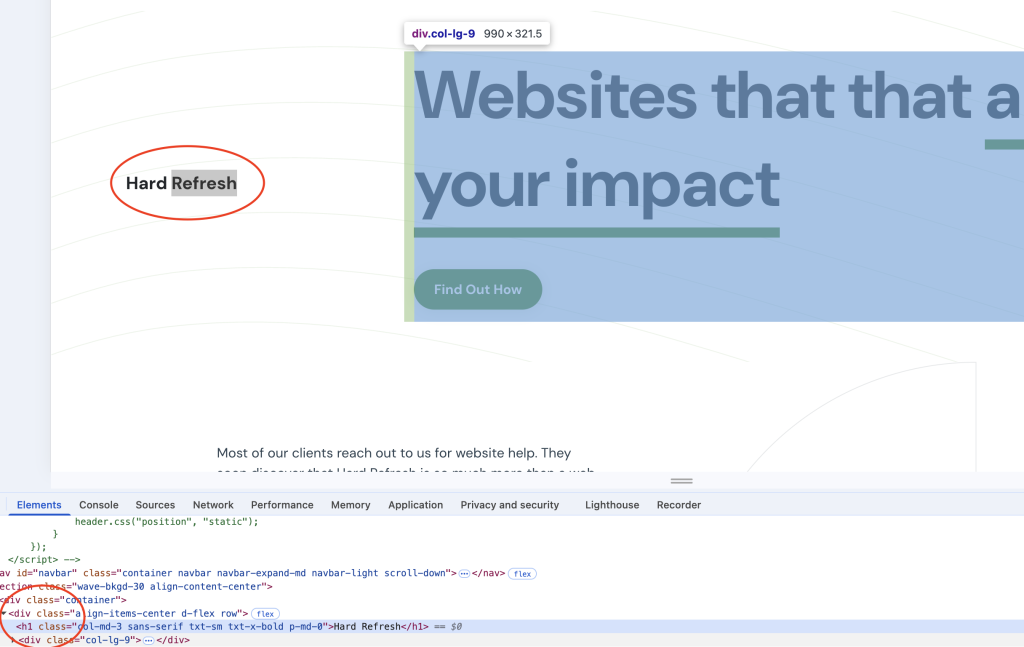
- One clear H1 per page. Verify it in your browser by right-clicking and selecting ‘Inspect Element.’ You can hover your cursor over your title and verify that it is wrapped in an <H1> tag.
- Real code, not styling. Ensure your developer used an actual H1 tag, not a styled paragraph, <span> or <div>.
- Logical hierarchy. Confirm the structure follows a clean outline (H1 to H2 to H3).
As you can see in the photo above, at Hard Refresh, we’ve wrapped our company name in an H1 to define who we are clearly, and this is the ONLY <H1> tag on our home page. Each page must have a single, descriptive H1 tag. The hierarchy must remain logical and accessible.
Action you can take in 30-Minutes or less.
Choose one key page on your website, ideally your homepage or services page, and inspect its H1 tag. Ask yourself:
- Does it describe what this page is about?
- Does it align with the page title and intent?
- Would a first-time visitor immediately understand what we offer?
If not, rewrite it today. This small change can immediately strengthen user experience and search performance.
Then, ask your developer to confirm that each page only has one <h1> tag. If there are more than one, have your developer make updates asap.
Final Thought
Your <H1> tag is not just a technical detail. It is where your marketing message and SEO strategy meet. Paying attention to it is one of the simplest ways to make your website works harder for your brand and for your users.